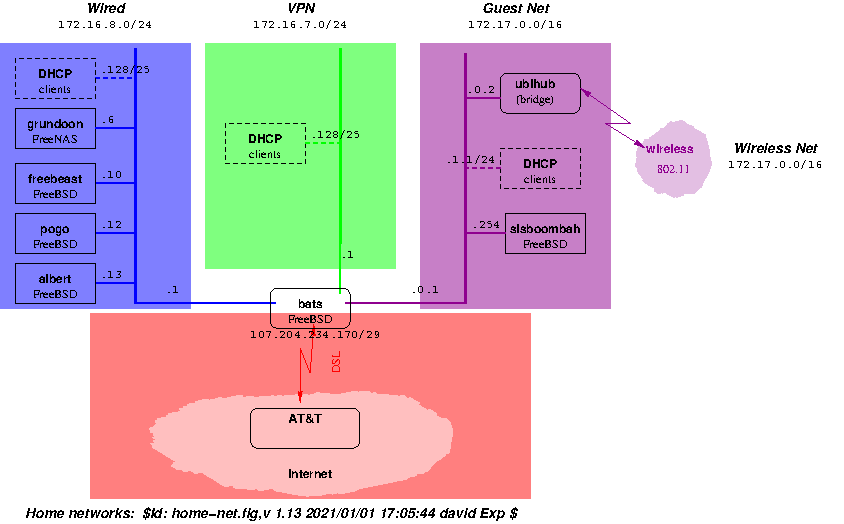
This is the process I use now for keeping the FreeBSD systems I use
reasonably up-to-date, while providing for a reasonably graceful
fallback to a known working environment.
/usr/ports for bats, albert and pogo actually physically resides
on the FreeNAS server (grundoon), though that's not
used directly.
Here are some command outputs to help illustrate the above; each was
done when the machine in question was booted from slice 1:
Daily Update Process
The basic process -- replicated both on freebeast and my
laptop -- is to:
- Prepare the target machine. This involves ensuring that the machine
is turned on, running recent stable/15 (i.e., booted from
slice 1), and connected to the Internal net.
- Via
cron, fire off a script that:
- Uses
git fetch --all to update the local FreeBSD git
ports repository on freebeast from git.freebsd.org.
(See Keeping FreeBSD sources up-to-date for details on
this.)
- Logs when the git fetch --all process starts and ends.
- Once the git repository is updated, proceed to do a
git
pull
in /usr/ports.
- Via
cron, fire off a script that:
- Uses
git fetch --all to update the local FreeBSD src and doc git
repositories on freebeast from git.freebsd.org.
(See Keeping FreeBSD sources up-to-date for details on this.)
- Logs when the git fetch process starts and ends.
Note that the way I do things, both /usr/src and /usr/ports are "working copies."
- Once I see (via
tail -F) that the git fetch/rsync process has
ended (and thus, that the git repository is updated), I issue git -C /usr/src pull
from within an execution of script (which, in turn, is
running under tmux).
- The
git pull operation is interactive, so if issues
arise, I get prompted to deal with it.
- Once any differences between the working directory and the
repository are resolved to my satisfaction, I exit
script,
then run script again -- this time, in "append"
(-a mode, and via sudo). (The updates to
/usr/src are done as a regular user; the installation of the
new kernel and world needs to be done as root.)
Within this (root) script invocation, I issue:
unsetenv TZ && \


setenv TMPDIR /tmp && \


id && \


mount && \


cd /usr/src && \


uname -aUK && \


date && \


make -j 14 buildworld && \


date && \


make -j 14 buildkernel && \


date && \


rm -fr /boot/modules.old && \


cp -pr /boot/modules{,.old} && \


make installkernel && \


date && \


( etcupdate_wrapper -B -p || etcupdate resolve -p ) && \


echo '>> etcupdate -p OK' && \


date && \


rm -fr /usr/include.old && \


echo '>> /usr/include.old removed' && \


date && \


mv /usr/include{,.old} && \


echo '>> /usr/include moved aside' && \


date && \


rm -fr /usr/share/man && \


echo '>> /usr/share/man removed' && \


date && \


make installworld && \


date && \


( etcupdate_wrapper -B || etcupdate resolve ) && \


echo '>> etcupdate OK' && \


date && \


make delete-old && \


echo '>> make delete-old OK' && \


date && \


df -k && \


gpart bootcode -b /boot/boot ada0s3 && \


echo '>> Now reboot verbosely'
(where "$s" denotes the currently-booted slice, as from "kenv vfs.root.mountfrom").
(Actually, I have a csh alias that expands to the above for
my laptop and freebeast -- it includes steps used to update any kernel modules;
freebeast doesn't have any, so it doesn't use those steps.).
Also, the "ports" activity is dependent on what ports are installed on
the machine in question.
- If all went well, reboot.
- If the reboot works, append (again) to the typescript file as root, and run:
  setenv TMPDIR /tmp && \


  id && mount && cd /usr/src && uname -aUK && date && \


  make delete-old-libs && \


  cp /var/run/dmesg.boot /var/tmp/dmesg.boot.`uname -r` && \


  uname -vp >>/var/tmp/uname.`uname -r | sed -e 's/\..*$//'` && date
(And yes, I have another alias for the above.)
- Set up for next round.
| Step # | via? | On freebeast | On my laptop
| | 1 | me | Turn on; ensure that it is booted from slice 1 | Connect
to internal network, running from stable/15 |
| 2 | cron | Run script at 0325 hrs. local time to use git fetch --all to update the local (on freebeast) FreeBSD git repository from git.freebsd.org machine, then perform git pullCODE> on /usr/portsRun script at 0330 hrs. local time to use rsync to update the local (on laptop) FreeBSD git repository from freebeast, then perform git pull on /usr/ports | |
| 2 | cron | Run script at 0330 hrs. local time to use git fetch --all to update the local (on freebeast) FreeBSD git repositories from git.freebsd.org machine. | Run script at 0332 hrs. local time to use rsync to update the local (on laptop) FreeBSD git repositories from freebeast |
| 3 | me | Once update of git repositories is done, issue "git -C /usr/src pull" within script | Once update of git repositories is done, issue "git -C /usr/src pull" within script | |
| 4 | me | Once git pull on /usr/src is done, review the window that shows the files that git actually touched; remove local changes that are no longer needed. | Once git pull on /usr/src is done, review the window that shows the files that git actually touched; remove local changes that are no longer needed. |
| 5 | me | Exit script, then re-start it in append mode, via sudo; type “_bw” (the alias for the above-mentioned sequence). | Exit script, then re-start it in append mode, via sudo; type “_bw” (the alias for the above-mentioned sequence). |
| 6 | me | If all went well, reboot. | If all went well, reboot. |
| 7 | me | If reboot is OK, update installed ports via portmaster
-ad, then re-invoke script in append mode via
sudo; type “_do” | If reboot is OK, update installed ports
via portmaster -ad, then re-invoke script in
append mode via sudo; type “_do” |
| 8 | me | Switch active boot slice and reboot (if I just finished testing head, power off) | Switch active boot slice and shutdown -r now. |
Also, freebeast does a poudriere bulk run after
building and smoke-testing FreeBSD STABLE on Saturday morning, and then
does a "catch-up" poudriere bulk run after
building and smoke-testing FreeBSD STABLE on Sunday morning (just before
the weekly update for the "production" machines). See
this document's
Postscript for details.
Weekly Update Process
This is for the "production" machines -- albert, pogo and
bats, presently -- which I update Sunday mornings.
At a convenient time -- usually, Saturday evening -- I "clone" the
booted slice onto the "other" slice for the machines that are to be
upgraded the following morning. This "cloning" process is (for the most
part) a matter of performing newfs, then using a dump
| restore pipeline to copy the running filesystems to the "other"
one. I use symlinks strategically for /etc/fstab, so the
effect is (e.g., for cloning slice 1 to slice 2):
umount /S2/usr
umount /S2
newfs -U /dev/ada0s2a && mount /dev/ada0s2a /S2 && dump 0Lf - /dev/ada0s1a | (cd /S2 && restore -rf - && rm restoresymtable) && date && sync && df -k /dev/ada0s1a /dev/ada0s2a && date
newfs -U /dev/ada0s2d && mount /dev/ada0s2d /S2/usr && dump 0Lf - /dev/ada0s1d | (cd /S2/usr && restore -rf - && rm restoresymtable) && date && sync && df -k /dev/ada0s1d /dev/ada0s2d && date
cd /S2/etc && rm fstab && ln -fs fstab.S2 fstab
Once that's done, rebooting from the just-populated slice (2, in the
above example) is supposed to be functionally equivalent to just
rebooting from the current slice (1, in the above example).
Note, though, that the machines in question have not been disrupted
(save possibly from a bit higher level of disk/file system I/O) while the
"clone" operation was in process.
Then, Sunday morning, after the "Daily" process described above is
completed on the build machine (freebeast) for stable/15, I
perform the following (within script in a tmux
session) on each of the "client" (or "target") machines:
mount -u -r /
mount -u -r /usr
mount /dev/ada0s2a /S2
mount /dev/ada0s2d /S2/usr
mount -u -w /S2
mount -u -w /S2/usr
ln -fhs /var /S2/var
mount -o ro freebeast:/usr/src /usr/src
mount -o ro freebeast:/usr/obj /usr/obj
id
mount
cd /usr/src
uname -aUK
make installkernel DESTDIR=/S2
mergemaster -U -u 0022 -p -D /S2
rm -fr /S2/usr/include.old
mv -f /S2/usr/include /S2/usr/include.old
rm -fr /S2/usr/share/man
make installworld DESTDIR=/S2
etcupdate -B -D /S2
make delete-old DESTDIR=/S2
df -k
(Note that each client system's /etc/src.conf identifies which kernel is to be
installed on it.)
That done, we get to the disruptive part:
- Switch default boot slice to the "other" slice.
shutdown -r now
Then, on reboot:
- [Note that these machines install
packages built on
freebeast.]
mount -u -w / && \
mount -u -w /usr && \
service sendmail forcestop ; ( service dovecot status && \
service dovecot stop || true ) ; ( service apache24 status && \
service apache24 stop || true ) && \
( test -f /var/tmp/old_pkgs && \
( pkg delete -f ` cat /var/tmp/old_pkgs ` && \
rm /var/tmp/old_pkgs ) || true ) && \
( test -f /var/tmp/new_pkgs && \
( pkg install ` cat /var/tmp/new_pkgs ` && \
rm /var/tmp/new_pkgs ) || true ) && \
( test -f /var/tmp/force_pkgs && \
( pkg install -f ` cat /var/tmp/force_pkgs ` && \
rm /var/tmp/force_pkgs ) || true ) && \
( ls /net/freebeast/tank/poudriere/poudriere/data/packages/*amd64-ports-home
&& \
pkg upgrade ) ; cd / && \
mount -u -r /usr && \
mount -u -r /
mount -u -w /usr && \
mount -o ro {freebeast:,}/usr/src && \
mount -w freebeast:/usr/obj /usr/obj && \
id && \
mount && \
cd /usr/src && \
uname -a && \
date && \
make delete-old-libs && \
cp /var/run/dmesg.boot /var/tmp/dmesg.boot.12.2-STABLE && \
log_uname && \
date && \
cd /usr && \
umount /usr/obj ; cd /usr && \
umount /usr/src ; cd / && \
mount -u -r /usr ; mount -u -r / ; rm -f /var/tmp/new_pkgs /var/tmp/old_pkgs
- Reboot a final time (ensure all services come up properly)
$Id: upgrade.html,v 1.47 2026/01/04 18:34:28 david Exp $